 ICA Net Installations
Instructions
ICA Net Installations
Instructions|
ICA Net Installations
Instructions |

 Requirements
:
Requirements
:
You need MacPPP & MacTCP , and a system of 7.0.1 or better software
to make connection to the Internet from your Macintosh. Also a minimum
of 8 Mb of RAM.
If you think of reinstalling the software you first have to delete
the files MACPPP & MACTCP, otherwise you may have difficulties.
SOFTWARE
Downloads:
First you need to download this software:
MacTCP (Select the file MACTCP%2.HQX)
CONFIGURACION
Open the "Control Panel" and also the " MacTCP". here are varios icons, select " MACPPP" and click "MORE".
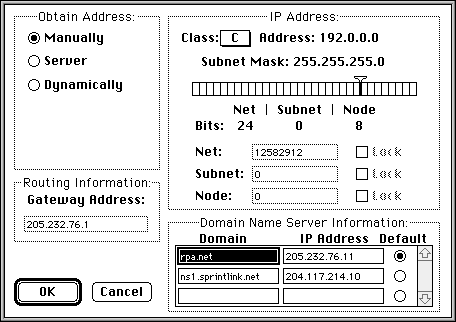
Thats all that you have to enter in MACTCP
Now we have to open MACPPP and the image below will appear:
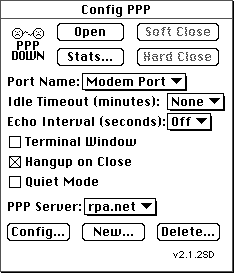
"OPEN" click here later
to connect
"MODEM PORT" Select your Comport of your modem.
"PPP SERVER" icanet.com.mx.
"CONFIG" Configuración del Script.
Click on "CONFIG"
"PORT SPEED" modem speed
"FLOW CONTROL" CTS & RTS (DTR)
"PHONE NUMBER" 91-66-347203.
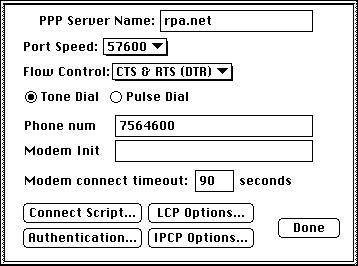
CLICK on "Connect script"
Into the script enter the following:
| WAIT | Username: | |
| SEND | Arturo | TR |
| WAIT | Password | |
| SEND | password | TR |
| WAIT | > | |
| SEND | PPP | TR |
Note: all you have to change is Arturo
and password.
click done
reboot